%20--%3e%3cpath%20d='M17.73,0v114.51H0V0h17.73Z'/%3e%3cpath%20d='M51.88,114.5h-16.47V26.14h14.33l.72,7.34c4.84-5.91,11.46-8.95,19.52-8.95,14.68,0,22.92,10.74,22.92,30.98v59h-16.47v-58.64c0-11.82-3.94-16.65-11.46-16.65-6.09,0-10.39,3.04-13.07,6.98v68.3h-.02Z'/%3e%3cpath%20d='M124.94,114.5h-16.47V26.14h14.33l.72,7.34c4.84-5.91,11.46-8.95,19.52-8.95,14.68,0,22.92,10.74,22.92,30.98v59h-16.47v-58.64c0-11.82-3.94-16.65-11.46-16.65-6.09,0-10.39,3.04-13.07,6.98v68.3h-.02Z'/%3e%3cpath%20d='M236.85,86.39c0,17.01-9.85,29.72-28.83,29.72s-28.83-12.53-28.83-29.72v-31.78c0-17.19,9.67-30.08,28.83-30.08s28.83,12.71,28.83,30.08v31.78ZM195.49,85.67c0,11.28,4.12,16.83,12.53,16.83s12.36-5.55,12.36-16.83v-30.53c0-11.28-3.94-16.83-12.36-16.83s-12.53,5.55-12.53,16.83v30.53Z'/%3e%3cpath%20d='M250.1,46.02c4.48-12.71,12.89-21.67,26.5-21.67,17.01,0,24.17,11.64,24.17,28.47v44.67c0,3.94,1.79,6.27,5.37,6.27h0l4.06,10.01c-3.09,1.3-7.1,1.81-9.79,1.81-6.8,0-10.92-3.04-13.43-7.16-4.83,5.19-10.92,7.52-18.08,7.52-12.89,0-21.13-9.85-21.13-24.89,0-16.47,8.59-29.19,32.05-29.19h4.48v-9.22c0-10.56-3.22-14.5-9.85-14.5-5.73,0-10.21,4.12-13.25,12.89l-11.1-5.01ZM284.3,97.13v-23.1h-4.48c-12,0-16.29,5.73-16.29,15.58,0,10.56,3.76,13.97,9.31,13.97,5.2,0,8.6-2.15,11.46-6.45Z'/%3e%3cpath%20d='M356.82,50.85c-2.15-8.95-6.44-12.35-12.18-12.35-7.7,0-12.36,4.83-12.36,16.65v30.35c0,11.82,4.48,16.83,12.36,16.83,6.09,0,10.03-3.58,12.36-12.89l12.36,3.94c-3.58,14.32-12.36,22.74-26.14,22.74-18.26,0-27.22-13.61-27.22-29.9v-31.6c0-16.83,9.13-30.08,27.22-30.08,12.89,0,22.2,8.24,25.78,22.2l-12.18,4.11Z'/%3e%3cpath%20d='M416.63,43.15h-17.01v48.61c0,7.34,3.4,10.92,9.13,10.92,2.33,0,3.38-.11,4.47-.54l3.76,9.85c-3.76,2.33-8.42,3.94-14.15,3.94-13.61,0-19.7-8.41-19.7-24.71v-47.18l-9.31-2.33v-11.63l10.21-.72.57-14.93,15.01-4.77v20.05h17.01v13.44h0Z'/%3e%3cpath%20d='M446.53,26.14v88.36h-16.47V26.14h16.47ZM445.64,0v17.55h-14.86V0h14.86Z'/%3e%3cpath%20d='M500.79,114.5h-18.8l-24.35-88.36h18.08l15.76,72.07,15.94-72.07h18.08l-24.71,88.36Z'/%3e%3cpath%20d='M548.06,73.41v12.08c0,11.28,4.66,16.83,13.25,16.83,6.8,0,10.56-3.76,13.43-14.15l12.36,3.94c-3.76,16.29-12.36,23.99-27.4,23.99-18.26,0-27.93-12.89-27.93-30.08v-31.6c0-16.83,9.49-29.9,27.93-29.9s27.04,13.25,27.04,30.62v18.26h-38.68ZM548.06,62.49h23.82v-8.77c0-10.74-4.12-15.76-11.82-15.76-8.24,0-12,5.19-12,15.76v8.77Z'/%3e%3cpath%20d='M614.75,107.12c0,4.4-3.69,8.99-8.77,8.99s-8.77-4.59-8.77-8.99v-1.23c0-4.4,3.62-8.92,8.77-8.92s8.77,4.52,8.77,8.92v1.23ZM599,107.12c0,3.88,2.87,7.2,6.9,7.2s7.13-3.32,7.13-7.2v-1.23c0-3.95-2.95-7.28-7.13-7.28s-6.9,3.32-6.9,7.28v1.23ZM605.91,107.94h-1.34v3.77h-2.31v-10.86h4.03c2.69,0,3.95,1.34,3.95,3.51,0,1.64-.75,2.84-2.16,3.21l2.61,4.14h-2.46l-2.32-3.77ZM604.56,106.3h1.64c1.27,0,1.64-.67,1.64-1.87s-.37-1.72-1.64-1.72h-1.64v3.59Z'/%3e%3c/svg%3e)
Anchoring the Digital Car to the Real World: How Innoactive Spatial Aligns to Your Seating Buck — and What WWDC Changes
For an automotive design review to be useful, the digital model and the physical world have to agree on one thing: where the car is. A photoreal, full-scale vehicle floating half a metre off the floor — or rotated five degrees away from the physical seating buck the reviewers are sitting in — isn't a review tool. It's a distraction.
This is the problem spatial anchoring solves, and it's one of the hardest, least-glamorous parts of building a credible XR review experience. In this post we'll walk through how Innoactive Spatial anchors content to the real world today, the specific workflow we built for seating bucks, and how Apple's latest WWDC announcements — active trackers and extended object tracking with reference objects — will push this from "very good" to "effortless and exact."
Why anchoring is the whole ballgame in automotive review
Most XR demos place a model "somewhere in front of you." That's fine for a showroom. It is not fine when:
- A team of engineers is reviewing ergonomics inside a physical seating buck — a real seat, real steering wheel, real pedals — and the digital interior has to line up with all of it, at 1:1, to the centimetre.
- Designers are comparing a streamed CAD/VRED model against a physical clay model or a real part on a table.
- Several people in the same room — and others joining remotely — all need to see the model in the same place, so they can point at the same panel gap and mean the same thing.
Get the anchor wrong and every downstream judgement (reach, sightlines, panel alignment, proportion) is wrong with it. So Innoactive Spatial treats anchoring as a first-class system, not an afterthought.
The anchoring methods in Innoactive Spatial today
Under the hood, every scene is pinned to the physical world through a single, explicit choice of anchoring type. Each type answers the question "what real-world signal is the car locked to?" differently, and each is suited to a different review situation.
World anchors
The scene is pinned to an absolute position in the room's world coordinate frame and persisted across sessions. Put the car down once; it's still in exactly the same spot when you put the headset back on tomorrow. Ideal for a fixed review space you return to again and again.
Image markers
The scene is anchored to a printed 2D image marker — either one of our built-in trackables or a custom marker you supply (with its real-world size). Markers are cheap, robust, and — importantly — the only anchoring type that natively synchronises across collaborators today, which makes them the workhorse for multi-user, same-room sessions where everyone must share one ground truth.
Reference objects (object tracking)
Instead of a flat marker, the scene locks onto a trained 3D reference object — a real, physical object the headset recognises by its shape. Train a reference object from a physical part or fixture, and the digital model snaps to it wherever that object sits. No printed marker required.
Active trackers
The scene follows a continuously tracked accessory — a peripheral whose pose is streamed live, so the content moves with the tracked object in real time rather than re-localising against a static marker or shape.
Switching between these isn't a mode you fight with — it's a single setting, and Innoactive Spatial keeps a per-type "last known position" so that when you switch anchoring types, the scene falls back to where that type last had it, even before the marker or object comes back into view. Behind the scenes there's a lot of careful engineering — drift correction against Apple's refined world anchors, outlier rejection on noisy detections, and re-localisation after the headset has been backgrounded or recentred — all so the car simply stays put.
The seating buck workflow: aligning by the steering wheel
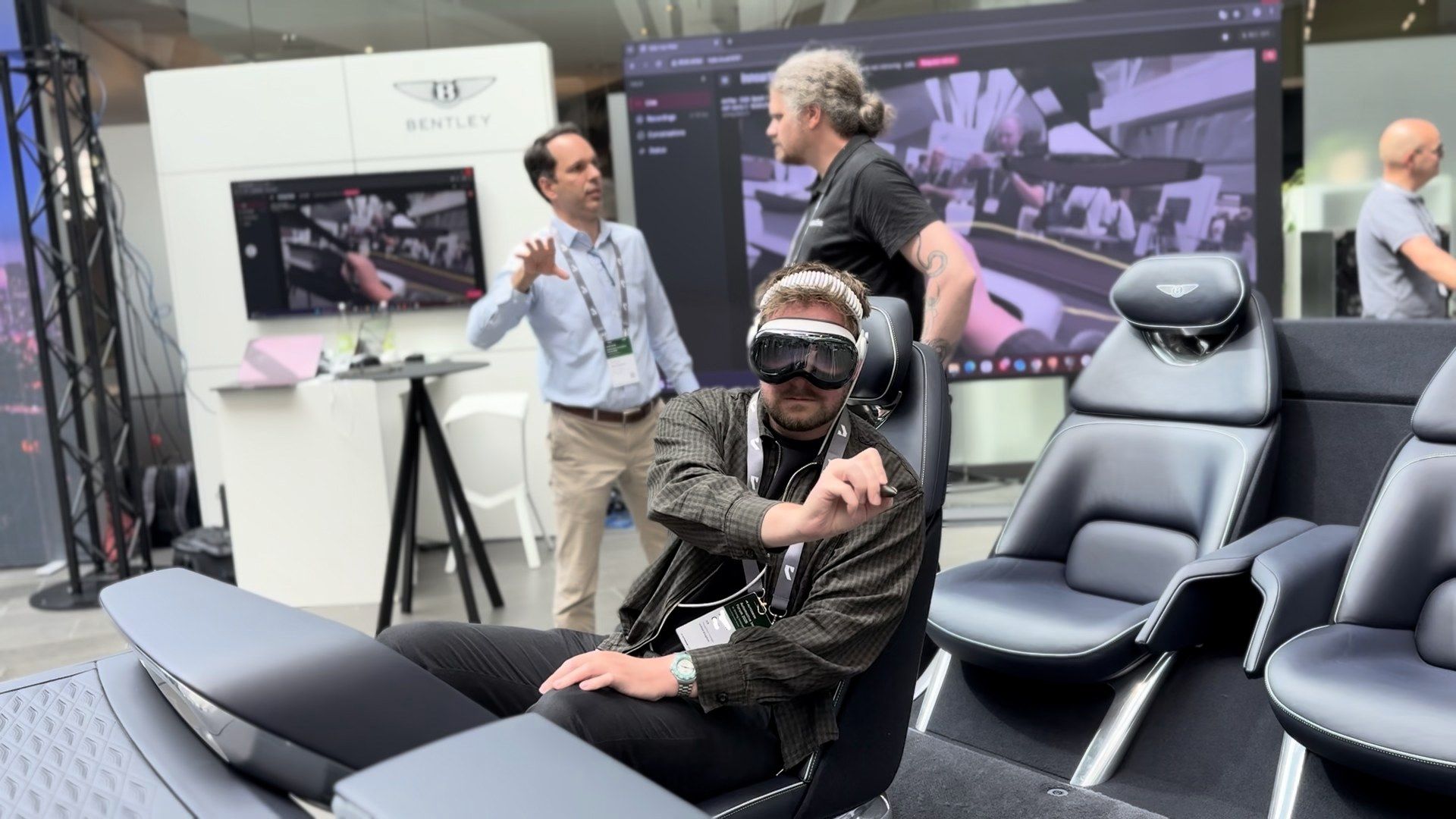
The seating buck is the marquee automotive use case — it's the centrepiece of our automotive design review solution and of the live demonstrations we ran at the Autodesk Automotive Innovation Forum 2026, including the auto-aligned Renault Twingo review on Granstudio's DIGIPHY dynamic seating buck. It also has a unique property we turned into an advantage: there's always a steering wheel. A physical wheel is a rigid, circular, precisely-shaped object that the user is going to put both hands on anyway. So we built a calibration that uses it directly.
Here's the experience in Innoactive Spatial today:
- Grab the wheel. The user places both hands on the physical steering wheel and looks at it. Using Apple Vision Pro's hand tracking, the app detects a stable two-handed grip at a plausible wheel width, and starts a short hold countdown to confirm.
- Turn it. The app guides the user — with on-screen and spoken instructions — to rotate the wheel ~45° to the left, then across to ~45° to the right, then back to centre, capturing the path of both hands the whole time. (Turn too fast and it'll politely ask you to redo it more slowly, because accuracy matters here.)
- We compute the geometry. From the swept hand positions, the app reconstructs the wheel's centre, its plane (normal), and the forward direction of the vehicle, then projects that forward vector onto the floor so the car always sits level regardless of how the wheel is tilted. It validates the result before trusting it.
- Fine-tune and lock. The digital car is oriented to match, the user nudges it into final alignment, confirms with a thumbs-up gesture, and the scene locks to the buck. The alignment can be saved as a preset so the next session snaps straight back into place.
The result: a streamed, full-scale digital interior — rendered from Autodesk® VRED or any other supported workflow — that lines up with the physical seat, wheel and pedals the reviewer is actually touching — calibrated in well under a minute, by gesture, with no external hardware and no printed markers taped to the buck.
What WWDC changes — and how Innoactive Spatial will evolve
At WWDC, Apple announced two capabilities that map almost perfectly onto the two halves of the automotive anchoring problem. We're bringing both into Innoactive Spatial.
Extended object tracking: train the buck once, snap to it automatically
Apple's object tracking received a substantial upgrade in the latest visionOS:
- An "extended" training mode in Create ML that produces markedly more accurate, more robust reference objects — explicitly tuned for handheld and awkwardly-shaped objects.
- High-frame-rate tracking, so a reference object can be tracked while it moves, not just while it sits still.
- Metric-space pose correction, giving applications access to accurate absolute-world coordinates — the foundation for measurement-grade alignment.
- Cross-platform reference objects: train an object once and use it on both visionOS and iPhone/iPad, no retraining.
For seating-buck review, this is transformative. Today our steering-wheel calibration is a brilliant workaround for the fact that a generic buck is hard to recognise. With extended object tracking, we can instead train a reference object of the buck itself — or of the steering wheel/dashboard assembly — once, and have the digital car snap to it automatically the moment a reviewer looks at it. No per-session calibration sweep, more robustness as people lean in and occlude parts of the rig, and metric-space accuracy that keeps panel gaps and reach studies honest. This is exactly the kind of fixed, scanned rig that a partner buck like Granstudio's DIGIPHY provides. And because reference objects now train once for both platforms, the same trained buck could be used from an iPhone on the shop floor as well as inside the headset.
We'll keep the hand-tracking steering-wheel calibration — it's hardware-free and works anywhere — but pair it with reference-object anchoring as the high-precision, zero-friction path for bucks that have been scanned ahead of time.
Active trackers: a tracked point on the rig, and real tools as spatial input
Apple also opened up actively-tracked accessories to third-party hardware for the first time through its new Spatial Accessories framework. A spatial accessory combines an LED constellation for optical tracking, an on-board IMU, and a Bluetooth link to the headset — and Apple is shipping reference tracker modules (with partners DFRobot and MIKROE) so that anyone can build one. (These trackers and the OS support are rolling out later in 2026, so think of this as the near-term roadmap rather than something shipping today.)
For automotive review, active trackers unlock two things:
- Bullet-proof buck tracking. Attach a tracked module to the physical buck (or to the steering wheel) and the digital interior follows it continuously and live — robust to lighting, occlusion, and people moving around the rig, and trivially re-acquired if the buck is moved. Innoactive Spatial already models an "active tracker" anchoring type for exactly this; the new framework is the hardware story that makes it broadly available.
- Real tools become spatial instruments. A tracked stylus, pointer, or physical prop becomes a precise input device inside the review — point at a feature, take a measurement, or annotate exactly where your hand is, with the physical tool and its digital effect perfectly co-located.
Where this leaves us
Stack these together and the picture for automotive design review on Apple Vision Pro gets very compelling:
- World anchors and image markers remain the dependable, no-hardware baseline — and markers stay our proven path for shared, multi-user sessions.
- Reference objects, supercharged by extended training, high-frame-rate tracking and metric-space pose, become the automatic, measurement-grade way to lock onto a known physical buck or part.
- Active trackers, via Apple's new Spatial Accessories framework, deliver continuous, occlusion-resistant tracking of a physical rig and turn real tools into spatial input.
The throughline is the one we started with: the physical and the digital, reviewing the same thing, in the same place, with confidence. The seating buck on the floor and the data in the headset are converging — and the gap between them is about to get a lot smaller.
Want to see this in your own review process? Get in touch — we'd love to show you Innoactive Spatial on Apple Vision Pro.
More from Innoactive
Innoactive Brings XR AI and Shared Spatial Experiences to the Autodesk Automotive Innovation Forum 2026
At AIF 2026, Innoactive teams up with NVIDIA, Lenovo, KIA, Bentley Motors, Granstudio, Renault, and Autodesk to show how Autodesk® VRED design reviews on Apple Vision Pro evolve — from AI-assisted variant configuration on the KIA Metavision, to multi-user passthrough reviews around a Bentley seating buck, to auto-aligned Renault Twingo reviews on Granstudio's DIGIPHY dynamic seating buck.
Introducing Innoactive Halo: An Airgapped AI Agent for Apple Vision Pro Design Reviews
Halo is an on-device AI agent that sits in your Vision Pro design review, captures every decision, and helps you act on it — running entirely on a single NVIDIA DGX Spark in your studio, with nothing sent to the cloud.
Innoactive Showcases Spatial Streaming to Apple Vision Pro Built on NVIDIA Omniverse at NVIDIA GTC 2026
Explore how Innoactive delivers OpenUSD applications to Apple Vision Pro using NVIDIA Omniverse and CloudXR at GTC 2026. Discover enterprise spatial streaming across automotive, healthcare, and digital twin use cases.